


RxLocal
4.74.14K Reviews
App Specs
- Version
- 6.2.1
- Updated On
- License
- Free
- Downloads
- 500,000+
- Developer
- PioneerRx, LLC
- Categories
- Medical
- Platform
- Android
Screenshots
 Analysis by AppCompare
I find RxLocal most useful as a practical bridge between a patient and the pharmacy that fills their prescriptions. Instead of treating every refill or quick question as a reason to call, I can use the app for routine pharmacy tasks from my phone. That convenience is real, but it depends on having a participating pharmacy and a working connection when I need to send or check something. I’d think of it as a companion to your pharmacy’s service, not a replacement for urgent medical advice or a complete health record.
Where the connection matters
The main benefit is not simply having pharmacy information on a screen; it’s being able to pass a request to the pharmacy without making a phone call. Refills and messages are the kinds of tasks where that can save a little time, particularly when the pharmacy is busy or I’m not in a good place to talk. The trade-off is that an app-based request still has to reach the pharmacy and be handled there. I wouldn’t assume that tapping a refill button means the prescription is immediately ready.
That distinction is useful when planning around a medication. If I’m running low, I’d send the request before I’m down to the last dose and leave enough time for the pharmacy’s normal process. If the request is time-sensitive, or I need to confirm that a prescription can be filled, a direct call may be the better route. RxLocal makes routine communication easier; it doesn’t remove the need to check with the pharmacy when timing or availability matters.
Messaging is a particularly sensible option for a concise question that can wait for a reply. I’d use it to ask about a routine pharmacy matter, rather than treating it like a live chat or expecting an immediate answer. For symptoms, a reaction, or another concern that needs prompt clinical attention, contact an appropriate healthcare professional instead. Keeping that boundary clear makes the app more useful, not less: it lets the pharmacy channel handle the questions it is suited for.
Using it between errands, work, and home
RxLocal fits best when I’m away from the pharmacy but have a moment to deal with a small task. Imagine noticing a refill is due while getting ready for work: I can send the request rather than trying to remember to phone later. If I’m coordinating medication for someone in my family, a shared view can also reduce the mental juggling, provided the account setup supports the way we manage that person’s prescriptions.
There’s a practical habit that makes this kind of app work better: use the prescription information as a prompt to plan, not as proof that every next step is complete. I’d still check the pharmacy’s response and confirm pickup arrangements before making a special trip. That small pause can prevent a wasted journey if the prescription needs attention first or the timing has changed.
People who manage several prescriptions may appreciate having the details gathered in one place, but they should be careful about what the app can and cannot tell them. A list or reminder can help with organization; it does not replace the directions on the medication label or advice from a pharmacist. If something looks out of date or doesn’t match what you were told, I’d ask the pharmacy to clarify rather than guessing from the screen.
Worth Reading Before You Choose

EA SPORTS FC Mobile 26 Is a Bigger Football Game, but It Takes Time

Flipboard Shows What News Apps Must Do Beyond the Feed

Switching to Android Auto Means Rethinking Your Driving Routine

Google Calendar Makes a Crowded Week Easier to Manage

Ludo King Makes the Most of the Minutes Between Plans

Baby Panda World Brings Quick Play to Modern Phones, but Its Game Library Feels Busy
Setup, access, and sensible expectations
Getting started means creating an account and linking it to a pharmacy that works with the service. That step is the key dependency: if your usual pharmacy isn’t available through RxLocal, the app may not help with the tasks you downloaded it for. I’d check that connection early, before relying on it for a refill that is close to due. The app is free, and PioneerRx, LLC is its developer.
RxLocal is a medical app rated for Everyone, with a 4.8 average from around 13,000 ratings and more than 500,000 installs. It first appeared in 2012, and version 6.1.2 is listed for devices running Android 11 or later. Those figures suggest a well-established option, though a high rating can’t tell me whether a particular pharmacy’s workflow will suit my needs. The most useful test is whether I can connect to my pharmacy and complete the everyday tasks I care about.
Compared with calling, the app offers a quieter way to send routine requests and questions, especially when I can’t talk freely. Compared with a general medication tracker, its distinctive purpose is the pharmacy connection rather than simply recording what I take. If I mainly want dose tracking, reminders, or a broader personal health log, a dedicated medication-management tool may fit better. If I need to discuss a complicated issue or resolve something immediately, a phone call remains more direct.
When a request stalls
Network-dependent tools are most noticeable when the connection is poor. I’d avoid leaving a refill request until I’m in a basement, on a weak public network, or rushing out the door; if the screen does not clearly show that a request went through, I would check before submitting it again. Repeating a request without checking could create confusion, while assuming it succeeded could leave me short on time. When the status is unclear, contacting the pharmacy is the safer way to close the loop.
If the app is slow or temporarily unavailable, I’d switch to the pharmacy’s usual contact method rather than letting the problem delay a needed refill. That is one reason I see RxLocal as a convenience channel, not the only route to care. A useful routine is to keep the pharmacy’s phone number accessible and handle non-urgent app tasks when the connection is reliable. The app can make ordinary errands smoother, but a backup plan matters whenever medication timing is important.
For a privacy-conscious user, it also makes sense to be deliberate about where and when to use a pharmacy app. I wouldn’t open medication details on a shared screen or send a message while distracted and then forget what I asked. Before adding a family member or managing someone else’s prescriptions, I’d make sure the arrangement is appropriate and that everyone understands who is handling requests. Convenience should not turn into uncertainty about responsibility.
Who will get the most from it
I’d recommend RxLocal to someone whose pharmacy is available in the service and who regularly needs to request refills or send brief questions. It is especially handy for people who can’t easily call during pharmacy hours, people who want a single place to check routine prescription information, and caregivers who are authorized to help organize a relative’s pharmacy tasks. Its value comes from shaving friction off repeated errands, not from doing the clinical decision-making for you.
It is less compelling if you rarely use prescription medication, prefer speaking to a person for every pharmacy question, or cannot connect your regular pharmacy. It may also disappoint anyone expecting an instant response, guaranteed same-day readiness, or a comprehensive medication safety system. Those expectations belong to different kinds of services. I’d judge it by a narrower question: does it make communication with my own pharmacy easier without making me less careful about confirming important details?
On a low-data mobile plan, I’d reserve app use for practical moments rather than repeatedly refreshing to see whether something changed. Sending a focused request and checking for a reply later is more useful than treating the app as a live feed. When I need certainty, I’d contact the pharmacy directly. That approach keeps the app’s convenience without relying on constant connectivity or assuming that a screen refresh equals progress.
Have you ever been in the middle of a hectic day and suddenly remembered you need to refill your prescription? Or maybe you're just curious about how to manage your medications more efficiently? That's where RxLocal comes into play. This app is like having a personal pharmacy assistant right in your pocket.
Getting Started with RxLocal
First things first, installing RxLocal is a breeze. Available on both Android and iOS, the app is a quick download away. Once you've got it installed, setting up is pretty straightforward. You just need to create an account and link it to your pharmacy. Most local pharmacies are already on board, which is a huge plus.
One thing I love is how user-friendly the interface is. You know how some apps make you feel like you need a degree just to navigate? Not this one. Everything is laid out clearly, so even if you're not tech-savvy, you'll find your way around without a hitch.
Features that Make Life Easier
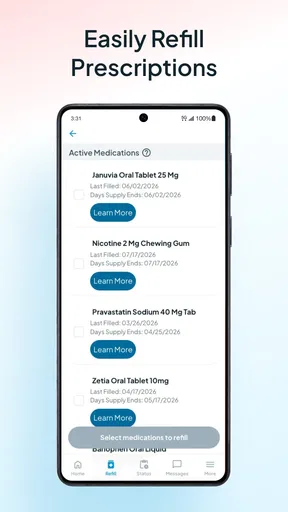
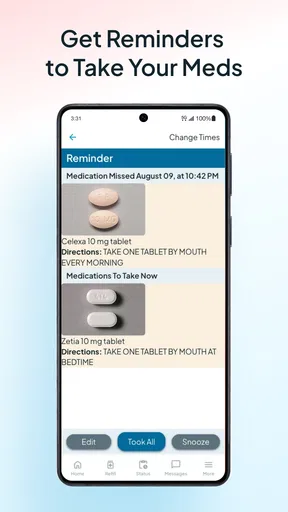
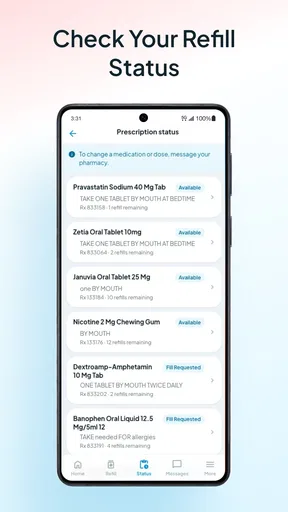
The heart of RxLocal is its prescription management. You can see all your medications listed neatly, complete with dosage instructions and refill dates. No more digging through your medicine cabinet or trying to remember if you’ve taken your pill today. The app sends you reminders so you stay on track.
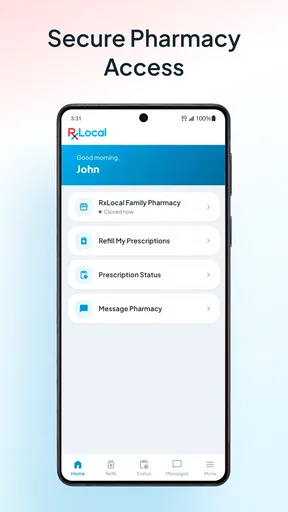
Another feature that stands out is the ability to refill prescriptions directly from the app. Just a few taps, and voilà, your meds are ready for pickup. It’s like magic, especially when you’re juggling a million other things.
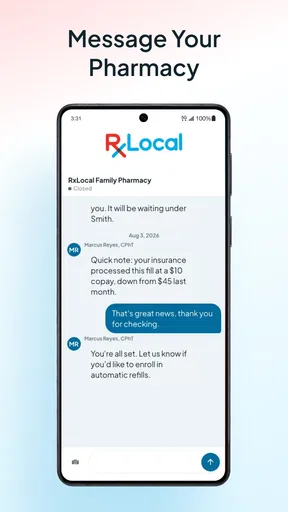
For those who are always on the go, the app’s messaging feature is a lifesaver. You can communicate directly with your pharmacist, asking questions or getting advice without needing to make a phone call. It's convenient, especially for those quick queries that don’t warrant an entire conversation.
The Personal Touch
What sets RxLocal apart is its personalized service. The app remembers your preferences and even your favorite pharmacy locations. It’s like having a pharmacist who knows you by name, right in your pocket.
There’s also a neat feature where you can add family members to your account. If you’re managing prescriptions for a loved one, this makes life so much easier. You can keep track of everything in one place, ensuring everyone gets their meds on time.
What Users Are Saying
"RxLocal has changed the way I manage my health. With reminders and easy refills, it's like having a pharmacy assistant with me 24/7." - Jane D.
"The messaging feature is a game-changer. I love being able to ask my pharmacist quick questions without having to call." - Mike L.
These are just a couple of examples, but the feedback is generally positive. Users appreciate the simplicity and efficiency that RxLocal brings to their daily routine.
Final Thoughts
In a world where we’re always on the move, apps like RxLocal are a breath of fresh air. It simplifies prescription management and connects you directly with your pharmacy. Whether you're a busy professional or someone managing multiple medications, this app is a game-changer.
If you haven't checked it out yet, I'd recommend giving RxLocal a spin. It’s a small step that can make a big difference in how you manage your health. Plus, who wouldn't want a little less stress when it comes to keeping track of their meds?
So, if you're ready to streamline your pharmacy experience, head over to your app store and download RxLocal. Trust me, your future self will thank you!
Pros
- User-friendly interface
- easy navigation.
- Secure messaging with your pharmacy.
- Prescription refills in just a few taps.
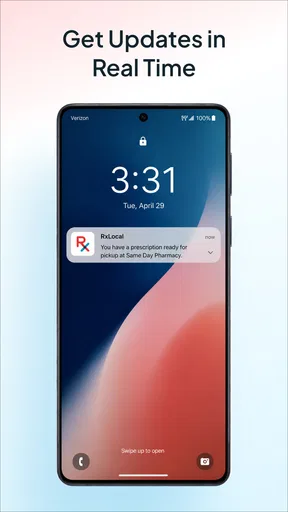
- Notifications for prescription status updates.
- Access to pharmacy details and hours.
Cons
- Limited to participating pharmacies only.
- Occasional app crashes reported by users.
- Requires internet for most features.
- No built-in medication reminders.
- Limited customization options.
FAQs for RxLocal
What is RxLocal and how does it benefit users?
RxLocal is a pharmacy app designed to streamline the prescription management process for users. It connects patients directly with their local pharmacies, allowing them to manage prescriptions, request refills, and receive notifications about their medication. This convenience helps users stay organized and ensures they never miss a dose.
Is RxLocal available on both Android and iOS platforms?
Yes, RxLocal is available for download on both Android and iOS platforms. Users can easily find the app on the Google Play Store or the Apple App Store. This accessibility ensures that a wide range of users can enjoy the benefits of managing their prescriptions digitally.
How secure is the RxLocal app in handling personal and medical information?
RxLocal prioritizes user privacy and security by implementing robust encryption measures to protect personal and medical data. The app complies with industry standards and regulations to ensure that sensitive information is safe from unauthorized access. Users can confidently manage their prescriptions knowing their data is secure.
Can I use RxLocal to set medication reminders?
Yes, RxLocal includes a feature that allows users to set medication reminders. This functionality helps users adhere to their prescribed medication schedules, reducing the risk of missing doses. By using this feature, users can maintain their health more effectively without the worry of forgetting important medications.
Does RxLocal offer customer support if I encounter issues?
RxLocal provides customer support to assist users with any issues they may encounter while using the app. Support can be accessed through the app or via the official website, where users can find contact information and FAQs. This ensures that any problems are addressed promptly, enhancing the overall user experience.


